Chapter 11
Taxation
Estimate the tax on your withdrawals and produce the tax report.
4 min read, 3 sections
A gain is only really yours after tax. Fructificare offers two complementary tools: a simulator to answer “what if I withdrew now?”, and a tax report to find, the following year, what needs to be declared.
11.1The tax simulator
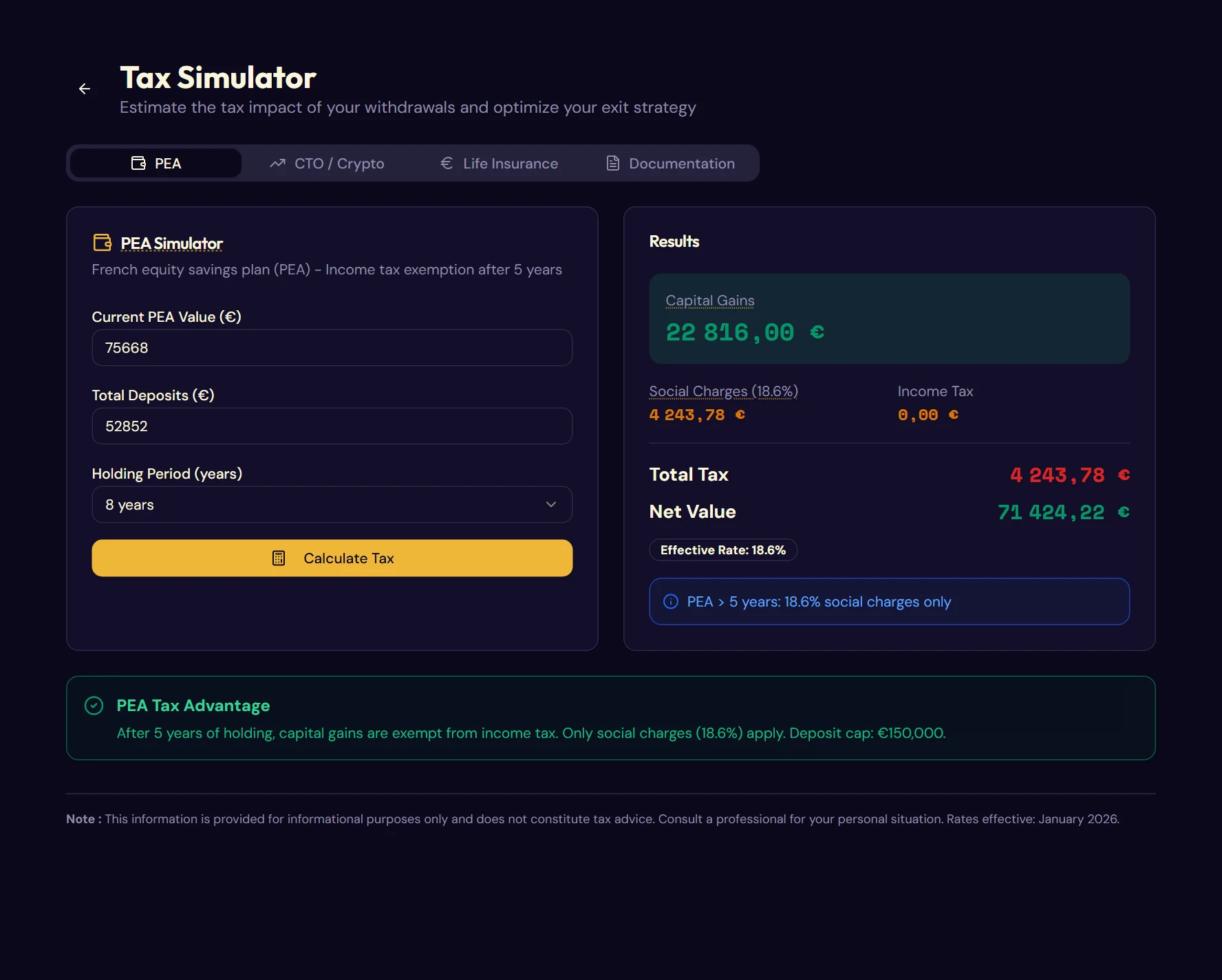
Available from the Simulation page, it works on amounts you enter freely (it does not read your envelopes).
| Tab | What you enter | What it calculates |
|---|---|---|
| PEA | Current value, deposits, holding period | Gain, social charges, income tax, total tax, net value, effective rate |
| CTO / Crypto | Same, with a “crypto” box | Same, applying the specific regime for crypto-assets |
| Life Insurance | Same, plus family status | Same, applying the €4,600 allowance (€9,200 for a couple) beyond 8 years |
| Documentation | - | The rates in force, one sheet per envelope, and optimization ideas |
Each tab ends with a contextual tip: for example, on a PEA less than five years old, the benefit of waiting for the milestone before withdrawing.
11.2The tax report
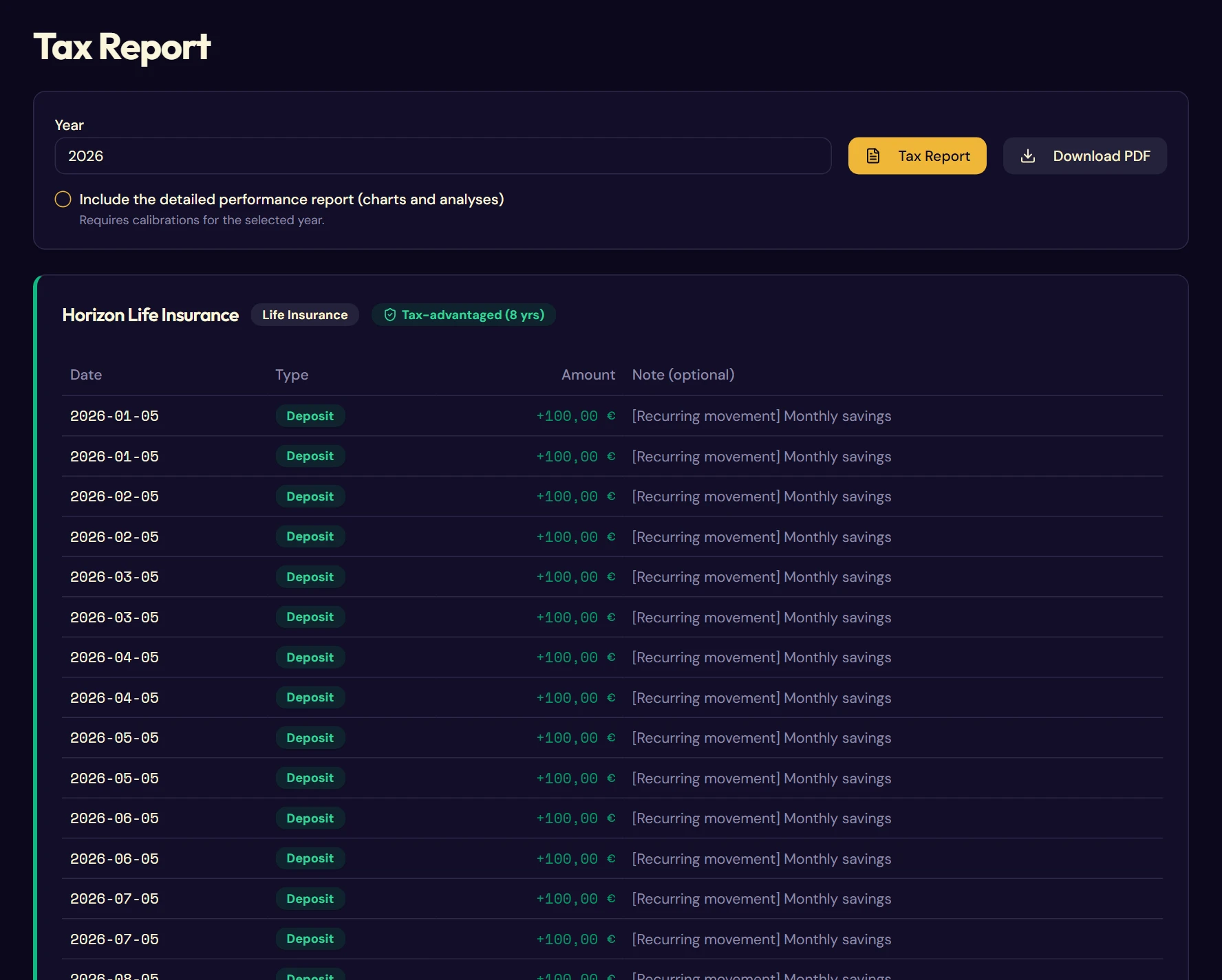
Unlike the simulator, the tax report works on your real data. You choose a year, and it reconstructs what happened on each envelope.
What each card shows
- the year's movements, with a “Taxable Withdrawals” badge on the withdrawals concerned;
- the year's deposits, the year's taxable withdrawals, the cumulative deposits;
- the current balance: the envelope's latest calibrated value, and its uninvested cash when there is some;
- the tax breakdown: estimated gain, social charges, income tax, total.
Which withdrawals are taxable
- PEA, PER, life insurance: only money that leaves the envelope is taxable; selling and keeping the cash inside triggers nothing.
- Securities account (CTO): each sale is taxable in the year it takes place, even if the proceeds stay as cash in the account.
- Crypto: a sale for euros is taxable, in any envelope. Gains are taxable for the year of the disposals, but are declared and paid the following year: the report reminds you of this on the card concerned.
Why calibrating changes everything
Fructificare applies the partial withdrawal rule, withdrawal by withdrawal and in chronological order:
Taxable gain = Withdrawal amount − (Net deposits × Withdrawal amount ÷ Total envelope value)
- Net deposits: the money you brought in, minus the share of capital already repaid by your previous withdrawals;
- Total envelope value: its value just before the withdrawal: the closest calibration, cash included, brought forward to the withdrawal date using the deposits and withdrawals made in between.
For example, for €100,000 paid into a life insurance contract worth €150,000, a withdrawal of €50,000 contains €16,666.67 of gains; €66,666.67 of net deposits then remain for the next withdrawal. For crypto, the law applies the same principle to disposals. For stocks in a securities account, the official calculation relies on the average purchase price of the securities sold: the result shown is then an estimate.
This formula has a direct consequence: as long as the envelope is not calibrated, the estimated gain is zero. Without a known valuation, the application cannot invent a gain, and will therefore show no tax. Calibrating is the condition for getting a useful tax estimate (chapter 6).
When no tax is shown
The tax lines only appear for envelopes that have a tax regime. Otherwise, a message explains why.
| Situation | Message shown |
|---|---|
| No withdrawal in the year | No withdrawal this year: no tax to declare. |
| Withdrawals without gains | Withdrawals with no gain over the period: no tax. |
| Custom envelope | Custom envelope: no pre-calculated tax regime. |
| Regulated savings account | Regulated savings account: interest exempt from income tax and social charges. |
| Withdrawals with gains | The details of the regime applied (see the appendices) |
The tax-advantaged badge
A green edge and a Tax-free (5 yrs) or Tax-advantaged (8 yrs) badge mark the envelopes that have passed their holding-period threshold by the end of the report year: 5 years for a PEA, 8 years for a life insurance contract.
11.3The PDF export
The Tax Report button produces the report on screen; you can Download PDF to turn this report into a document to archive or to send to your accountant.
The standard PDF contains:
- a header and the list of the envelopes concerned;
- a summary by asset type: withdrawals, gains, tax, with a reminder of the rates applied;
- the details by envelope: movement table, summary box, tax-maturity mention;
- numbered footers.
The detailed performance report
A checkbox adds four pages of analysis. It requires at least one calibration in the year: without a valuation, there is no performance to plot.
- Cover: the annual curve of your portfolio.
- Portfolio summary: start and end values, allocation pie chart, regulated savings accounts counted separately.
- Performance by envelope: one section per envelope, with its monthly curve.
- Overall annual analysis: returns by year, deposit fees, FIRE progress.